Latest update: 2026-08-21
This guide shows how to configure, simulate, synthesize, and test a minimal single-core ESP SoC. The common ESP steps apply to every supported board. Open the AMD/Xilinx or Intel/Altera sections when a vendor-specific command or board connection is required.
Intel/Altera development preview Coming soon The Terasic DE10-Pro SX port supports Ariane bare-metal and Linux payloads, Ibex and LEON3 bare-metal payloads, and accelerators built with the RTL or Third-Party flows. Accelerator and cache HLS flows are not supported on Intel/Altera. This port is not part of a released ESP version yet.
Choose a target FPGA board
Each directory under <esp>/socs/ is a working directory for one FPGA or ASIC
target. Run configuration, simulation, synthesis, programming, and payload
targets from the selected directory.
AMD/Xilinx flow — VC707 example
This guide uses the Xilinx VC707 as the AMD/Xilinx example:
cd <esp>/socs/xilinx-vc707-xc7vx485t
The same general flow applies to the supported VCU118, VCU128, and proFPGA targets. Use the working directory for your board and a supported Vivado version; the current ESP setup guide lists the validated version.
Intel/Altera flow — Terasic DE10-Pro SX
The Intel/Altera port targets a Terasic DE10-Pro SX with an Intel Stratix 10 SX 280 FPGA:
cd <esp>/socs/terasic-de10-pro-sx
Quartus Prime Pro 19.4 is the validated FPGA tool version. HPS boot artifacts
are validated with Intel SoC EDS 19.1. Before the first FPGA build, follow the
complete board bring-up instructions in
socs/terasic-de10-pro-sx/README.md, including the SD-card, HPS boot, and HPS
utility setup.
Run make help in either working directory to list the available ESP targets.
Configure the SoC
Restore the board’s default ESP configuration when starting from an unknown configuration:
make esp-defconfig
Open the ESP configuration GUI to inspect or modify the design:
make esp-xconfig
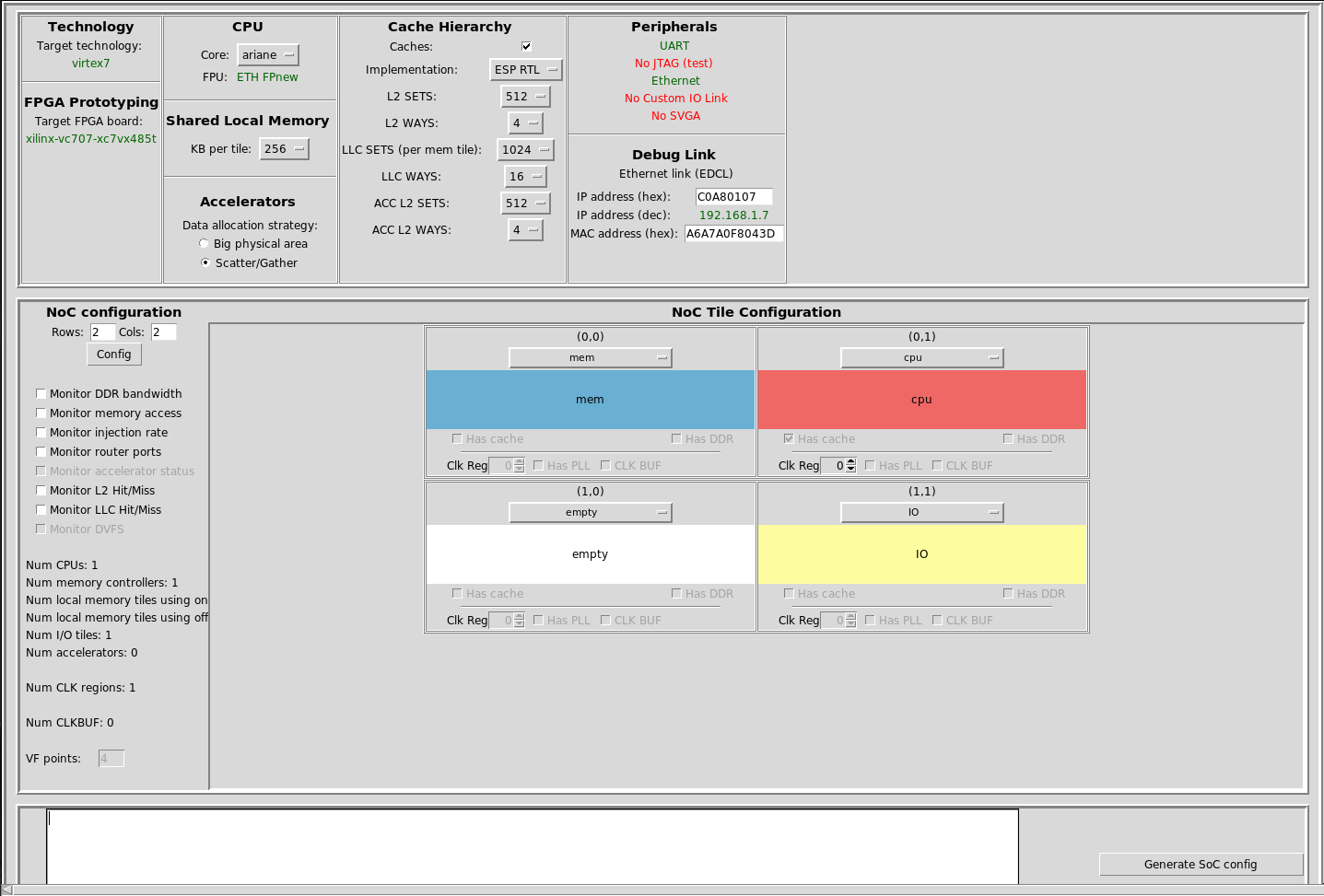
A minimal ESP SoC has one processor tile, one memory tile, and one auxiliary I/O tile. The default processor and cache settings vary by board. ESP supports Ariane (64-bit RISC-V), Ibex (32-bit RISC-V), and LEON3 (32-bit SPARC V8); select only a CPU/payload combination supported by the target board.
The following image shows the VC707 configuration as an example. The DE10-Pro SX uses the same ESP GUI concepts even though its board wrapper and FPGA tools are different.
Configure the host-to-board connection
AMD/Xilinx — ESP Ethernet debug link
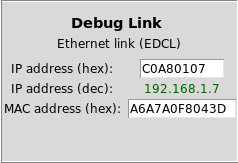
The Xilinx example uses ESP’s Ethernet debug link. Set its static IP and MAC address in the Debug Link section of the ESP GUI.
For a direct cable, give the host interface an address in the same subnet as
ESP. For example, if ESP uses 192.168.1.2, the host can use
192.168.1.3/24. Replace <interface> with the actual interface name and use
your operating system’s supported network configuration tool.
For a routed connection, reserve ESP’s configured address in the router and make sure another device cannot receive it through DHCP.
Intel/Altera — HPS Linux control path
The DE10-Pro SX run backend reaches the board’s HPS Linux system over SSH. Set
INTEL_HPS_HOST to the HPS hostname, IP address, or user@host. When no user
is included, ESP uses the board’s default terasic user.
make fpga-run INTEL_HPS_HOST=<hps-host>
The HPS utilities esp_peek and esp_load_bootrom_edcl must already have been
built on HPS Linux and placed in INTEL_HPS_RUN_DIR, as described in the board
README. INTEL_HPS_SSH_PORT, INTEL_HPS_USER, INTEL_HPS_PEEK, and
INTEL_HPS_LOADER support non-default HPS setups.
Choose the cache implementation
ESP’s cache hierarchy adds a private L2 cache to processor tiles and a last-level cache to memory tiles. The Use Caches option enables the hierarchy. Multi-core SoCs require it; a single-core design may disable it.
The SystemVerilog implementation (ESP RTL) is the portable default. With that implementation, the CPU and accelerator L2 caches must use compatible set and way configurations.
AMD/Xilinx only — optional SystemC + HLS caches
For research on cache microarchitecture, AMD/Xilinx targets may select the SystemC + HLS implementation. Generate each required cache configuration once with Cadence Stratus HLS:
make l2-hls
make llc-hls
The HLS scripts are under rtl/caches/esp-caches/systemc/. The first run can be
slow because it synthesizes reusable hardware resources.
Intel/Altera: use the ESP RTL caches. The HLS cache implementation relies on AMD/Xilinx mappings and is not supported by the current port.
Run a full-system RTL simulation
ESP supports several simulators. Use the target available in your CAD environment:
# Siemens ModelSim/Questa
make sim
# or
make sim-gui

# Cadence Incisive
make ncsim
# or
make ncsim-gui

# Cadence Xcelium
make xmsim
# or
make xmsim-gui
For ModelSim/Questa GUI runs, start the simulation from the simulator console:
run -all
The simulation targets compile ESP RTL, the vendor libraries required by the
selected board, and the working directory’s systest.c. Generated software
artifacts are placed under soft-build/<cpu>/.
Compile the default bare-metal software without starting a simulator:
make soft
Build the FPGA image
AMD/Xilinx — build with Vivado
Generate the Vivado project and bitstream:
make vivado-syn
On completion, ESP creates a top.bit link in the SoC working directory.
Intel/Altera — build the HPS artifacts and Quartus image
Build the HPS boot artifacts before generating the HPS-enabled FPGA image:
make hps
make quartus-syn
make hps writes generated files under local/boot/; these files are ignored
by Git and must not be committed. make quartus-syn creates the Quartus project
from tracked Tcl, SDC, Verilog, and ESP RTL inputs and embeds the matching SPL
HEX in the HPS-enabled SOF.
Use make quartus-gui when interactive Quartus inspection is needed. The
quartus/ project directory, reports, and FPGA images are generated locally
and must not be committed.
Build bare-metal and Linux payloads
make soft produces the boot ROM and default bare-metal application. Linux is
built from the SoC working directory so each design can keep a separate
configuration and root-filesystem overlay:
make linux
The result is soft-build/<cpu>/linux.bin. Build the matching ESP CPU toolchain
before the first software build; see the setup guide for Ariane,
Ibex, and LEON3 instructions.
Intel/Altera — distinguish ESP payloads from HPS boot artifacts
The ESP CPU payload and the DE10-Pro HPS software are separate:
make softandmake linuxbuild software for the selected ESP CPU.make hpsbuilds the U-Boot, TF-A, and device-tree artifacts used by the board’s HPS boot chain.- The HPS-side loader utilities are built natively on HPS Linux.
Re-stage the HPS FIT and DTB on the SD card after rebuilding the HPS artifacts.
The exact filenames and U-Boot environment are documented in
socs/terasic-de10-pro-sx/README.md.
Program the FPGA
AMD/Xilinx — Vivado hardware server
For a local Vivado hardware server on its default port:
FPGA_HOST=localhost XIL_HW_SERVER_PORT=3121 make fpga-program
For a remote cable, set FPGA_HOST and XIL_HW_SERVER_PORT to the host running
hw_server.
Intel/Altera — local or remote Quartus JTAG
Program the HPS-enabled SOF through the selected USB-Blaster:
make fpga-program
For a remote JTAG server, start jtagd on the cable host, enable remote access,
and pass the server to ESP:
make fpga-program FPGA_HOST=<jtag-host>
Quartus JTAG uses port 1309 by default. Use
INTEL_JTAG_SERVER_PORT, BOARD_CABLE, or BOARD_CABLE_MATCH when the server
or cable selection differs from the default. Do not commit JTAG server
passwords or hostnames.
Open the serial console
For a remote TCP UART bridge, ESP provides make uart and make xuart:
UART_IP=<uart-host> UART_PORT=<uart-port> make uart
For a locally attached USB serial device, use a serial terminal such as Minicom. Standard users normally need membership in the operating system’s serial-device group.
AMD/Xilinx serial settings
The VC707 example uses 38400 8N1, with no hardware or software flow control.
Confirm the settings for other boards in their working-directory configuration.
Intel/Altera serial settings
The DE10-Pro HPS U-Boot and Linux console use 115200 8N1. Keep the console
open during first-time U-Boot environment setup and HPS boot troubleshooting.
Run a payload on FPGA
AMD/Xilinx — ESPLink payload loading
After programming the FPGA, load the default bare-metal application or Linux image:
make fpga-run
make fpga-run-linux
Set the board and debug-link connection variables required by your working directory. Do not assume payload loading also programs the FPGA; program the bitstream explicitly when starting from an unconfigured board.
Intel/Altera — HPS Linux payload loading
Boot HPS Linux with the staged ESP HPS artifacts, make sure the HPS utilities are available, and then load an ESP payload over SSH:
make fpga-run INTEL_HPS_HOST=<hps-host>
make fpga-run-linux INTEL_HPS_HOST=<hps-host>
The backend uploads the generated boot ROM and payload, performs the required
wake reads, and invokes the HPS loader. This does not replace make
fpga-program; the FPGA must already contain the matching Quartus image.
Vortex on DE10-Pro SX: sustained Vortex Linux workloads can intermittently fault or panic the HPS and are currently experimental. Short tests do not establish stability. The equivalent validated Xilinx flow is stable; see the DE10-Pro README’s known-issue section.
Connect to ESP Linux
When the ESP Linux image exposes a network interface, its leased address is printed on the serial console. From a machine on the same network:
scp <local-file> root@<esp-ip-address>:~
ssh root@<esp-ip-address>
Use only credentials and network settings appropriate for your deployment.
Change default development passwords before placing a board on an untrusted
network. On the DE10-Pro, INTEL_HPS_HOST identifies the separate HPS Linux
control system; it is not automatically the address of Linux running on the ESP
CPU.
Use prebuilt material
The existing single-core prebuilt material targets the
Xilinx VC707, VCU118, and VCU128 flows. Each archive identifies its board and
processor and normally contains top.bit, prom.bin, systest.bin, and
linux.bin. Place the files in the locations documented with the archive, then
follow the Xilinx programming, serial, payload, and SSH sections above.
No DE10-Pro SX prebuilt set is currently documented on this site. Use the board README and generate matching HPS, Quartus, and payload artifacts locally.